Yes! Renderforest’s Image-to-Video feature allows you to upload still images and transform them into short, dynamic video clips.
How to animate your photos:
Select the Flow: Choose the AI Video Editor flow when starting your project.
Upload Your Image(s) under the Reference Image(s) section.
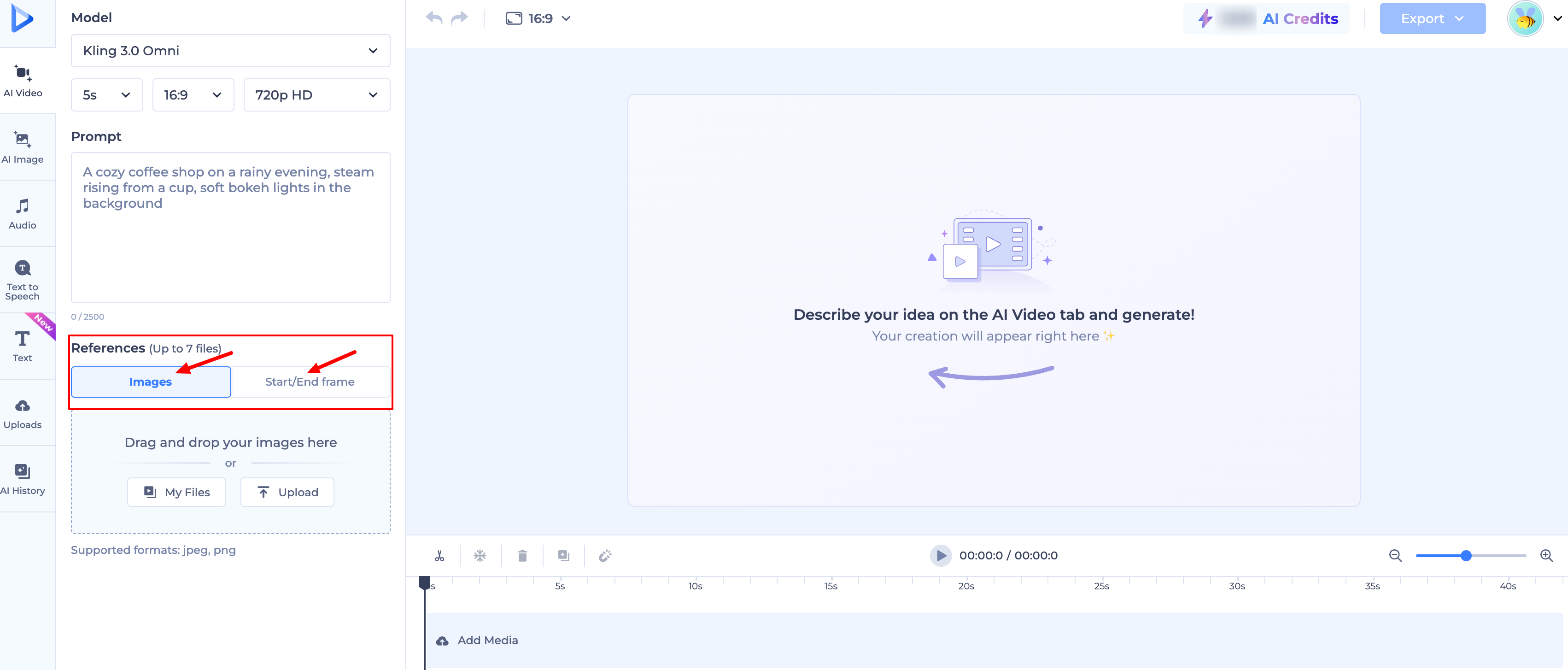
Describe the Motion: In the prompt box, describe exactly what you want to happen.
Example: Upload a photo of a coffee cup and type: "Steam rising from the cup with a gentle camera zoom-in."
Pick Your Model: Different models handle motion differently. Choose the one that best fits your desired style.
Generate: Click generate, and the AI will "breathe life" into your static photo.
What can I animate?
Portraits: Make a person blink, smile, or talk.
Landscapes: Add moving clouds, flowing water, or swaying trees.
Products: Create cinematic pans or zooms around your product to make it pop for an ad.
Characters: Animate your own drawings or AI-generated character art.
Using "First and Last Frames" for Custom Animation
If you want even more control, you can upload two photos:
Upload your photo as the First Frame.
Upload a slightly different version (or a different angle) as the Last Frame.
The AI will intelligently animate the transition between the two, giving you a custom-designed movement.
Note: For the best results, use high-quality, clear images. The more detail the AI has to work with, the more realistic the final animation will be!
Was this article helpful?
That’s Great!
Thank you for your feedback
Sorry! We couldn't be helpful
Thank you for your feedback
Feedback sent
We appreciate your effort and will try to fix the article